One System for Construction Projects, from Tender to Handover

Built from the case study and operating needs of PT Goldtek Utama Mandiri, the Project Management System helps a construction company manage tenders, project execution, material procurement, labor, suppliers, and operating costs in one connected system.

Connect office and field data, follow work progress, and manage project costs with better-structured information.

                                For us, this was a great opportunity. Building a system is not only about delivering technology. It is about understanding how a business runs and turning those needs into a solution that fits.
01Challenge

Understanding the Operational Challenge

Managing a construction project is complex because information comes from many places: the office, the field team, procurement, and management. This probably is not unique to construction.

When data is spread across chats, spreadsheets, and paper documents, getting the full picture of a project is hard. Following actual costs, confirming the status of material orders, reviewing tender results, and knowing work progress all need information that is connected.

  1. Field TeamWhatsApp chat

    "Need 50 bags of cement for floor 2"

  2. OfficeSpreadsheet

    Re-typed into the summary sheet

  3. ProcurementPaper form

    Re-typed into the PO form

  4. ManagementMeeting

    Which data is the latest?

The need was not just to move record keeping into a digital tool. It was to build a more structured flow of information so each team can do its job better.

02Approach

The Dakana Techworks Approach

We turned those operating needs into a system design that connects project management from start to finish. The design took into account the workflow, the needs of each division, how data relates, and access split by user responsibility. It also leaves room to grow as the company needs more.

03Modules

Six modules: from tender pre-project to material price history

Each module solves one problem on a project, and shows who uses it.

A won tender becomes a project

The project anchors cost and procurement

Purchases and costs tie to one project

Suppliers and price history fill from POs

01 · Praproyek

Tender Management

  • Tenders scattered across chats and folders
  • Aanwijzing minutes hard to find
  • No view of which clients you win most
  • One record per tender, with its stage
  • Minutes stored on each tender
  • Win rate and client list on a dashboard
Illustration
  • OwnerSee win rate and the clients you win most
  • AdminLog tenders, schedules, minutes, then turn a win into a project
  • Site teamRead tender schedules and minutes
Aanwijzing minutesUpload documents per tender
Tender stages and scheduleFrom announcement to winner
Status and reasonWon, lost, or not pursued
Dashboard and win rateWins and status breakdown
Client listTenders and wins per client
Turn a win into a projectName, client, value carry over

02 · Proyek

Project Management

  • BoQ in Excel, progress in chat
  • S-curve built by hand every week
  • Project status out of step with documents
  • Tiered BoQ, imported from Excel
  • S-curve built from daily progress
  • Status follows the SPK and BAST
Illustration
  • OwnerWatch every project, S-curve, and cost vs progress
  • AdminSet up BoQ, weights, schedule, SPK, and BAST
  • Site teamLog progress with photos, on their own projects only
  • HRGASee the project list and HRGA dashboard
Tiered BoQWork items up to 5 levels
BoQ import from ExcelBad files rejected with the rows listed
Work weightsAutomatic from value, adjustable
Progress with photosCumulative percent, photo or PDF attachments
S-curvePlan against actual
Gantt and scheduleStart and end date per item
SPK and BAST lifecycleStatus follows official documents
Cost vs progressSpend against progress

03 · SPP, Surat Jalan, Surat PO

Procurement & Material Management

  • SPP sent by chat, numbers inconsistent
  • Approvals leave no trail
  • Purchases per project hard to trace
  • SPP and PO numbers automatic
  • Every decision logged: who and when
  • Procurement history per project
Illustration
  • OwnerTrace every purchase and who approved it
  • AdminApprove SPP, then issue the Surat PO
  • Site teamRaise SPP and Surat Jalan straight from site
Automatic SPP and PO numbersPO format is configurable
SPP approval flowDraft, pending, accepted or rejected
Delivery notesCreated from an SPP, more than one allowed
Surat PO (4 steps)Supplier, document, recipient, review
Procurement historySPP, delivery notes, PO per project
Excel exportSPP and PO with company letterhead

Works with M2M5

04 · Subkontraktor, Upah Tukang, Gaji Staf

Workforce & Operational Cost Management

  • Worker wages tallied in a notebook
  • Subcontractor terms not tracked
  • Project cost visible only after the fact
  • Wage recap per period, Excel export
  • Subcontractor terms and amount paid
  • Cost compared with the RAP limit
Illustration
  • OwnerSee project cost against the RAP limit
  • AdminLog worker wages, subcontractors, and Item Lain
  • HRGAManage staff pay and each staff member’s project history
Subcontractors and termsOnly amounts already paid are counted
Worker wage recapPer period and per worker
Staff pay and costMonthly recap per project
Other itemsSpending outside materials and wages
Summary vs RAP limitTotals per category against the usage limit

Works with M2

05 · Riwayat Supplier

Supplier Management

  • Supplier names written differently
  • Last price not kept
  • Purchase history scattered
  • Supplier picked from a list at PO time
  • Items and last price fill in automatically
  • Purchase history per supplier and item
Illustration
  • OwnerSee how often you buy from each supplier
  • AdminManage suppliers and pick from the list when raising a PO
Supplier databaseAdd, edit, search, sort
Supplier check on POPO only for registered suppliers
Items and last priceUpdated automatically from POs
Purchase historyDate, project, quantity, unit price

Works with M3

06 · Riwayat Material

Item & Price History

  • Past material prices hard to find
  • Item names differ on every SPP
  • Negotiating without price data
  • Price history across projects
  • Item name suggestions while typing an SPP
  • Search and filter by supplier
Illustration
  • OwnerCheck past prices before approving a purchase
  • AdminLook up cross-project prices as a reference for negotiation
  • Site teamGet item name suggestions when raising an SPP
Cross-project price historyEvery PO line becomes a record
Item search and filterKeyword, supplier, sort order
Item suggestions on SPPName and unit filled from past data

Works with M3

Screens

The System in Daily Use

Interface screens from the Project Management System, taken from features the client team uses every day.

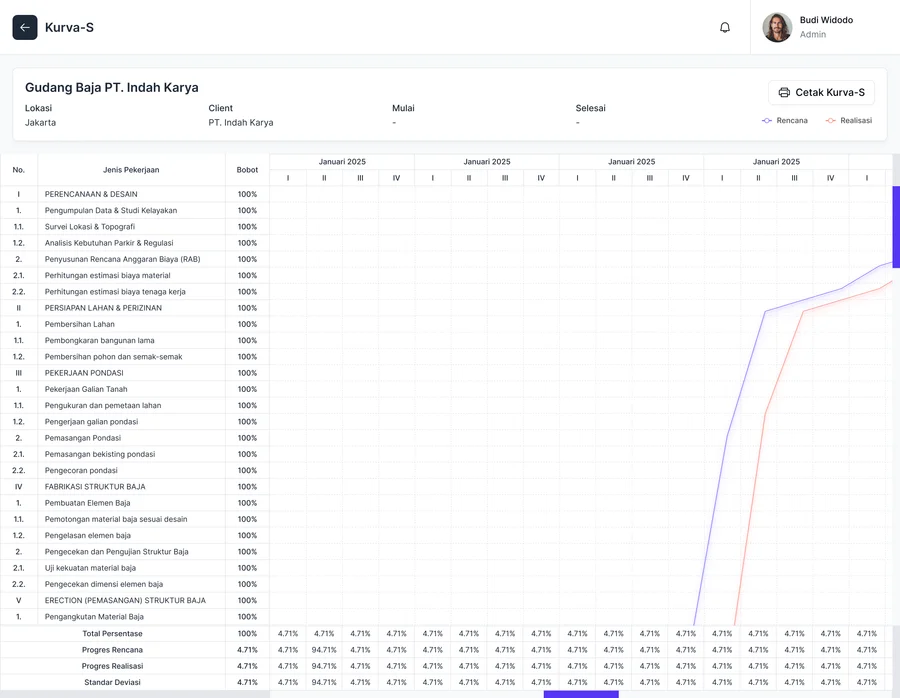
S-Curve feature: chart comparing planned and actual progress of a construction project
S-Curve
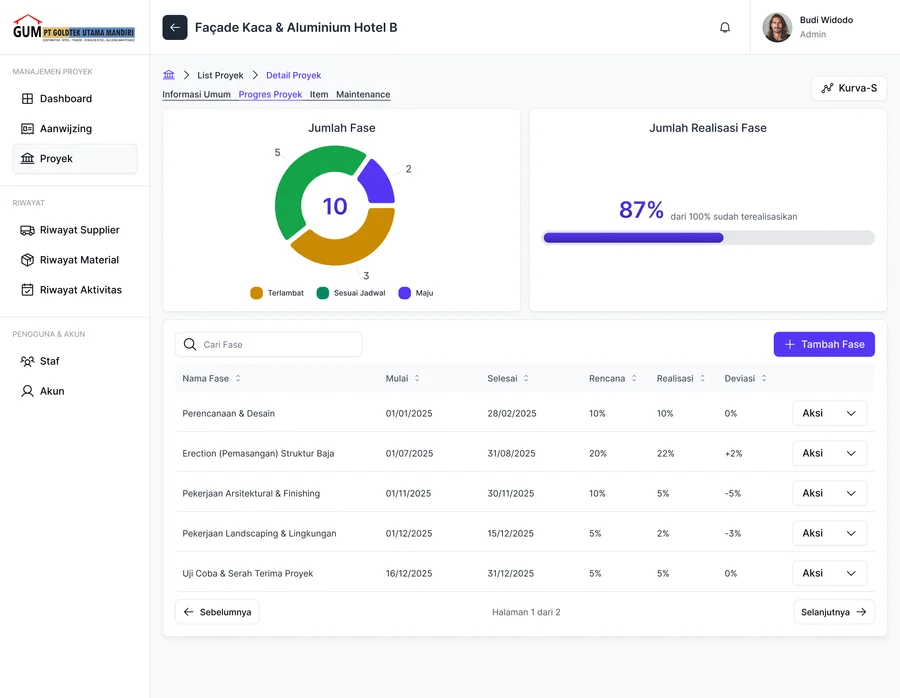
Project phase list with actual status and a delay indicator for each phase
Phase List
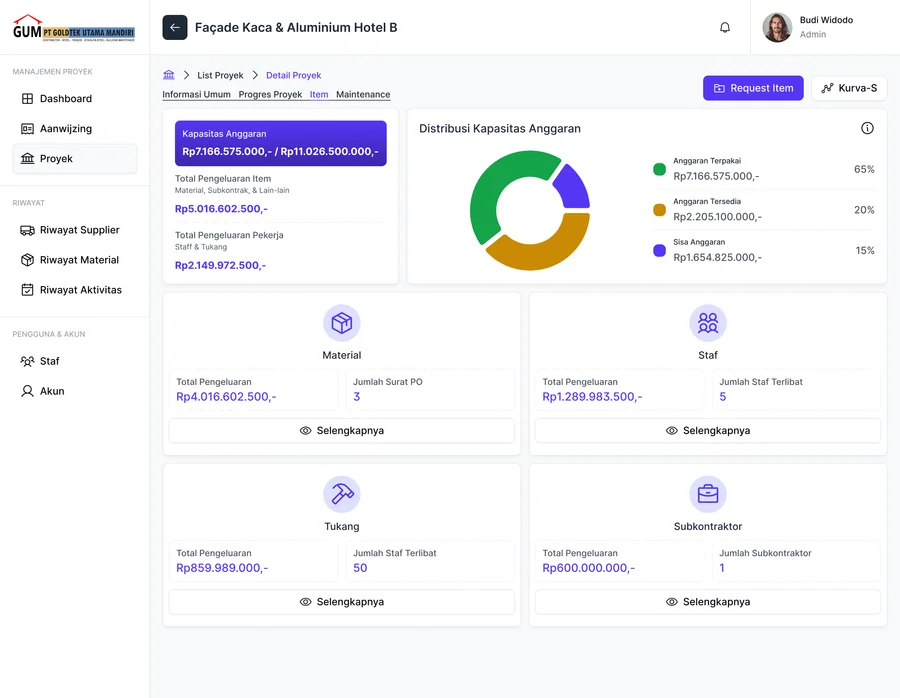
Budget capacity breakdown with spending split into Material, Staff, Workers, and Subcontractors
Item List
04Digitalization

Digitalization as a Collaborative Process

Every company has its own workflow, challenges, and needs. That is why a digital solution cannot simply be copied from one business to the next.

Working with Goldtek, we built a system that starts from the needs of construction project management, with a view on how each process can connect and grow further.

We believe the right technology does more than help a business handle today. It also leaves room for what the business will need later.

Open to Working with Construction Companies

Dakana Techworks is open to working with construction companies that want to improve their business processes with digital tools that fit how they operate.

That can mean a company website to strengthen your online presence, or a custom system for project management, procurement, and internal operations. We are glad to talk and explore what you need.

It does not have to start with a complex system. Each collaboration can begin with the problem you face today and grow according to business priorities.